![Docketbook-logos_reverse-horizontal.png]](https://help.docketbook.com.au/hs-fs/hubfs/Docketbook-logos_reverse-horizontal.png?height=40&name=Docketbook-logos_reverse-horizontal.png)
Why add a Subcontractor to an Order
Docketbook has always supported the ability to allocate a job to a subcontractor to allow them to allocate their team members to the job. Assigning the subcontractor at order level, gives them the ability to not only create jobs but also allocate them to their subcontractors effectively creating 3 tiers of subcontract allocation, as follows:
- Customer on the Order - can see the Order with rates receives Sent Dockets
- Supplier on the Order - can see the Order with rates. Can create Jobs and allocate them to a Job subbie. Can see all dockets on the order
- Subcontractor on the Order - can see the Order (rates are hidden). Can create Jobs and allocate them to a Job subbie. Can see dockets only on the Jobs they create or are assigned
- Subcontractor on the Job - can see the Job they are assigned and can allocate only to their team. Can see dockets created by their team only.
- Operator on the Job - can see and accept their own jobs only. Can see dockets that they create (or are assigned)
The following table illustrates the different roles in delegating work to your supply chain.
| Customer | Supplier | Order Subbie | Job Subbie | Operator | |
| Create Order |
Yes |
Yes |
No |
No |
No |
|
View Order |
Yes |
Yes |
Yes |
No |
No |
|
See Rates |
Yes |
Yes |
No |
No |
No |
| Create Jobs |
Yes |
Yes |
Yes |
No |
No |
| Allocate Jobs to Subbies |
No |
Yes |
Yes |
Yes |
No |
| Allocate Operators |
No |
Yes |
Yes |
Yes |
Yes |
| See Draft Dockets |
No |
Yes |
Only on assigned jobs |
Only on assigned Jobs |
Own dockets only |
| See Sent Dockets |
Yes |
Yes |
Only on assigned jobs |
Only on assigned Jobs |
Own dockets only |
How to Set a Subcontractor on an Order
As a Supplier on the Order, open the detail view and go the 'Assigned Subcontractors' section. Add your subcontractor here.

Creating & Assigning Jobs
Jobs can be created by the customer, supplier or subcontractor.
- Customer - Customers on the order can create jobs that will appear with a Review status. These can then be allocated to subcontractors (including the Order Subcontractor)
- Supplier - Jobs created by the supplier, can be assigned to the order subcontractor giving them delegation rights to manage the job and allocate to subcontractors
- Subcontractor - Jobs can be created and managed by the Order subcontractor. This role has delegated permissions to manage the job on behalf of the supplier, including allocating to other subcontractors (job subbies).
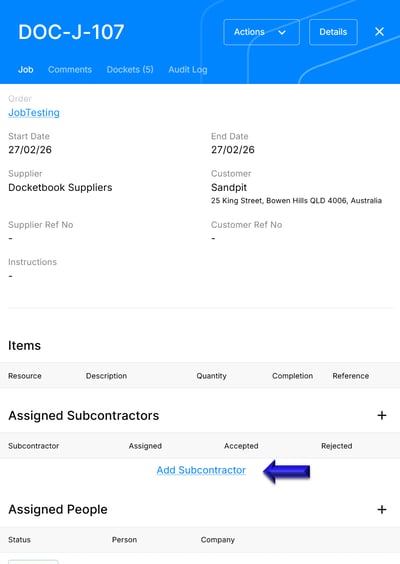
Numbering
Jobs and Dockets are, by default, numbered using the Suppliers numbering scheme.