![Docketbook-logos_reverse-horizontal.png]](https://help.docketbook.com.au/hs-fs/hubfs/Docketbook-logos_reverse-horizontal.png?height=40&name=Docketbook-logos_reverse-horizontal.png)
NOTE: To access the Invoicing section, you must be either an Administrator, Super User, or have the required permissions for Invoicing for your Docketbook company. For more information, click here.
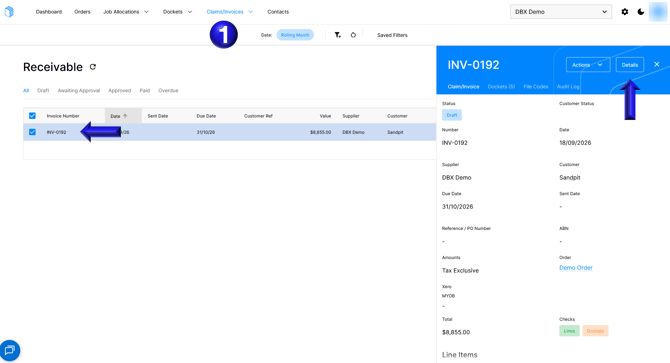
- First navigate to the Claims/Invoices section, select the invoice that needs a variation and select Details
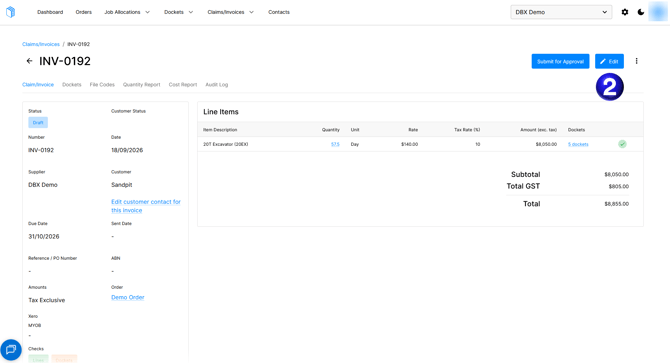
- Once you have opened the invoice in draft you can then select Edit to be able to add a variation
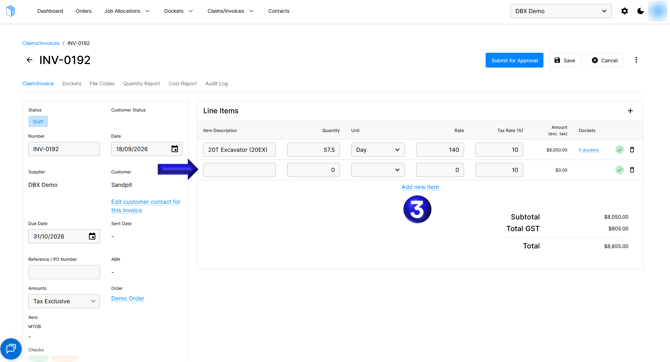
- You can then select the Add new item to add a new line that can be used for creating a variation.
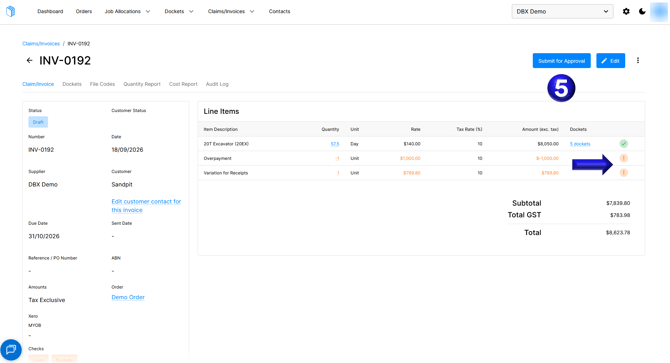
- You might need to create a variation for an overpayment where you might add a negative quantity of the rate that has been overpaid, or a variation for additional costs incurred that have receipts with a positive quantity, after you have set up your variations you can then Save the invoice
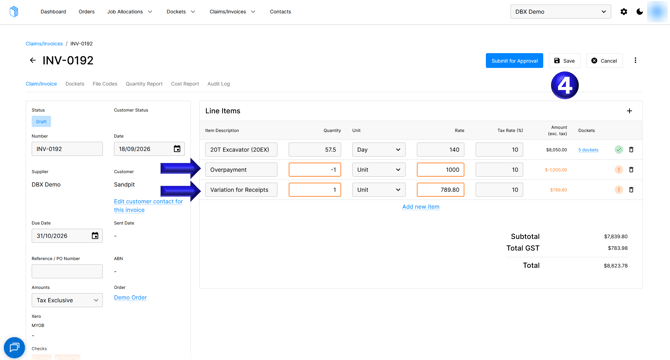
- Note that the orange warning is expected in this case as these variations are not captured on any dockets linked to the invoice or order, if you're happy with the invoice you can then Submit for approval, have the invoice Approved, and Send the invoice as usual.
If you need any further help, please contact support@docketbook.com.au