![Docketbook-logos_reverse-horizontal.png]](https://help.docketbook.com.au/hs-fs/hubfs/Docketbook-logos_reverse-horizontal.png?height=40&name=Docketbook-logos_reverse-horizontal.png)
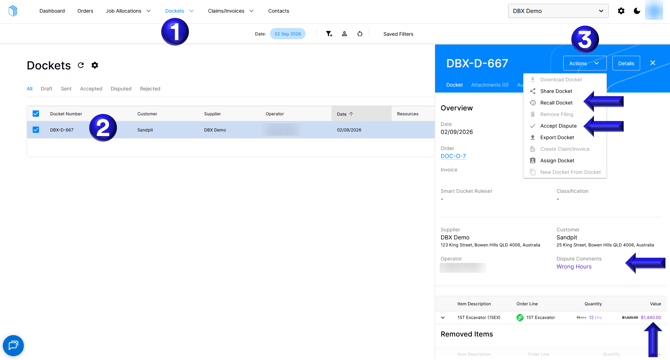
- Go to the Dockets tab on Docketbook
- Select the Disputed Docket that needs to be reviewed reading the dispute comments in purple and the adjustments suggested by the Customer.
- You can then select Actions and then Accept Dispute to accept the changes or Recall Docket to recall the docket to draft status to make necessary amendments.
If you need any further help, please contact support@docketbook.com.au