![Docketbook-logos_reverse-horizontal.png]](https://help.docketbook.com.au/hs-fs/hubfs/Docketbook-logos_reverse-horizontal.png?height=40&name=Docketbook-logos_reverse-horizontal.png)
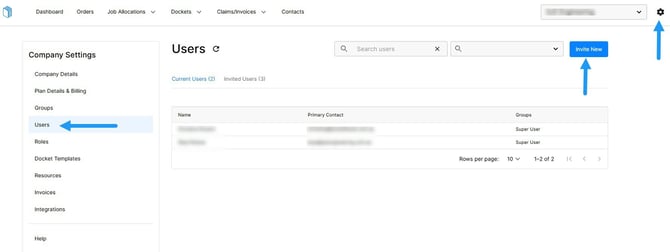
1. Click the settings tog on the top right hand corner of the screen, then select Users where you can then click "Invite User"
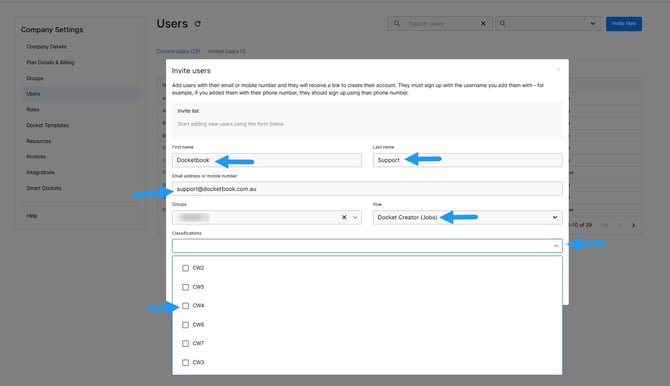
2. From here, enter the user’s first and last name, then add their example email address using their first name with @example.com (for example, John@example.com). Next, assign their access to your company by selecting the appropriate Groups and the user role “Docket Creator (Jobs)”. Then click the Classification drop down box to select what role applies. When finished, click “Add”.
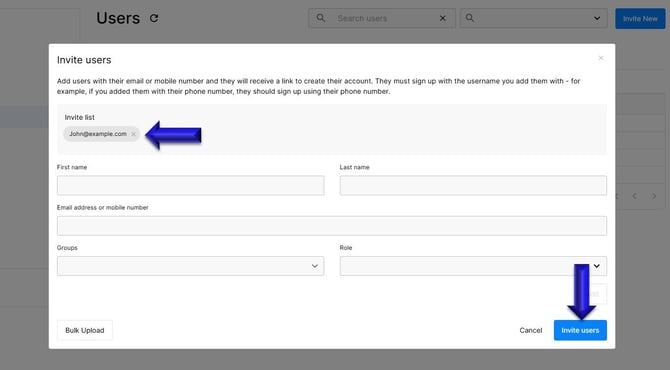
3. Once you click Add, you'll see the user's details in the Invite List and then be able to select "Invite Users"
If you need any further help, please contact support@docketbok.com.au