![Docketbook-logos_reverse-horizontal.png]](https://help.docketbook.com.au/hs-fs/hubfs/Docketbook-logos_reverse-horizontal.png?height=40&name=Docketbook-logos_reverse-horizontal.png)
Note: To be able to access this feature, you need to have either Super User Or Administrator access. For more information on Docketbook user roles, click here.
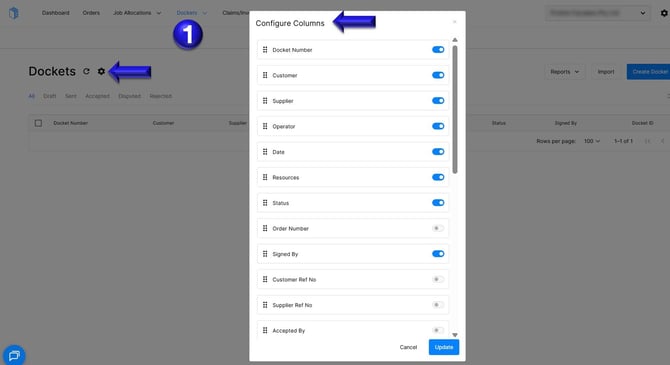
1. In the Dockets column, click the settings tog next to Dockets to open the Configure Columns box.
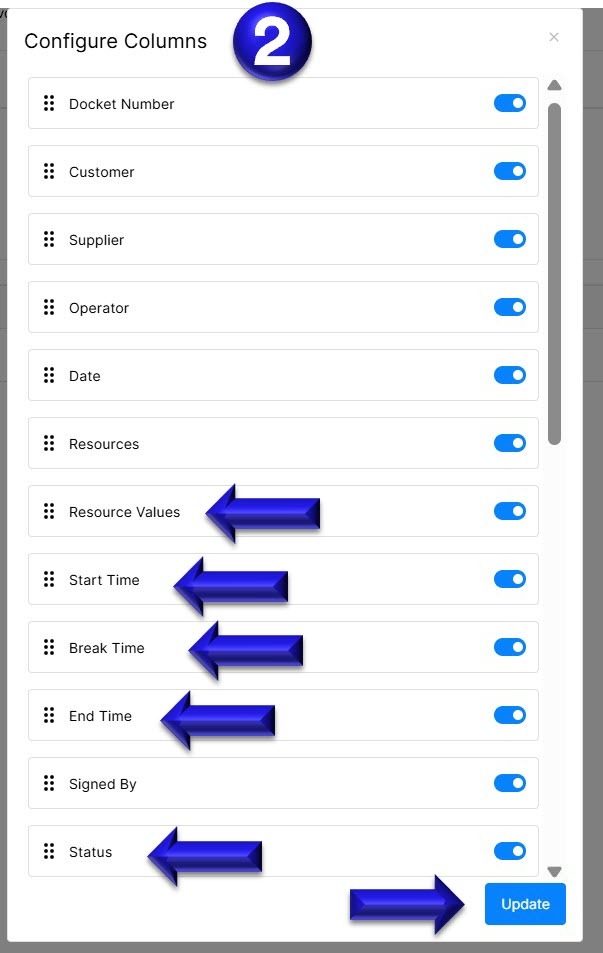
2.Inside the box, enable the following columns in this order: Resource Values, Start Time, End Time, and Break Time. You can click and drag each column to arrange them. Finally, ensure that the Status column is positioned at the end. Once set out as shown below, you can click Update to save the changes.
If you have any further questions, please contact support@docketbook.com.au