![Docketbook-logos_reverse-horizontal.png]](https://help.docketbook.com.au/hs-fs/hubfs/Docketbook-logos_reverse-horizontal.png?height=40&name=Docketbook-logos_reverse-horizontal.png)
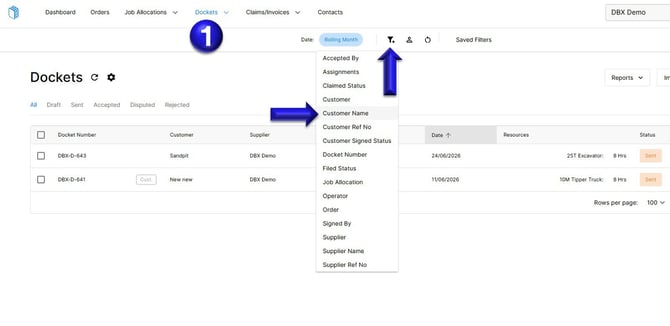
1. In the Docketbook web app, go to Dockets, click the filter icon, and then choose Customer Name.
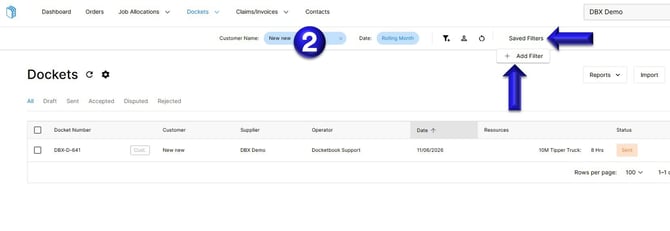
2. You can then type in the Customer Name, then select Saved Filters then + Add Filter
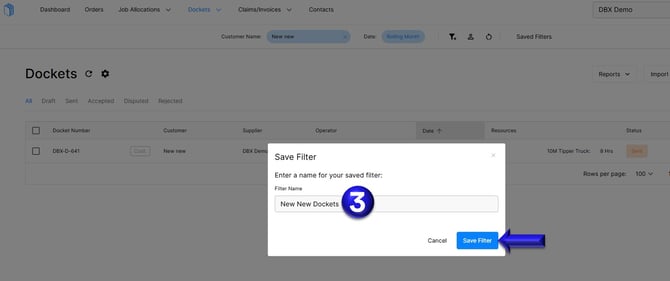
3. Name the filter in a way that clearly describes what it will automatically display. In the example below, we have named it New New Dockets. Then click Save Filter.
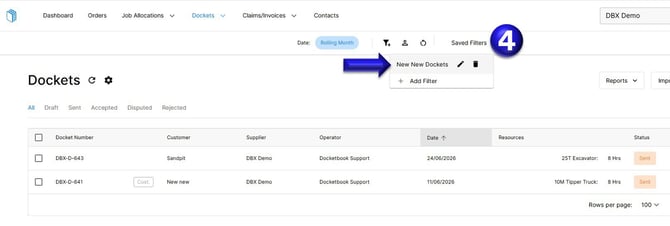
4. Whenever you need to quickly view only dockets for the certain customer, click Saved Filters and select your Saved Filter.
For any further help, please contact support@docketbook.com.au