![Docketbook-logos_reverse-horizontal.png]](https://help.docketbook.com.au/hs-fs/hubfs/Docketbook-logos_reverse-horizontal.png?height=40&name=Docketbook-logos_reverse-horizontal.png)
To be able to access and complete these steps, you must have Super User or Administrator user role. For more information on user roles, click here.
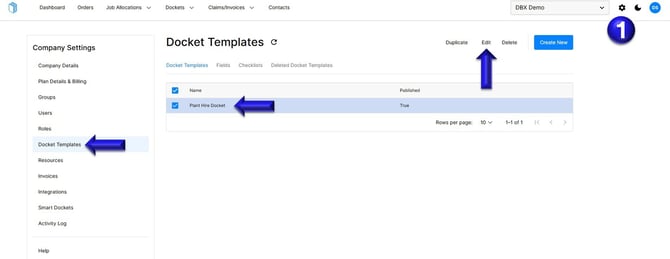
1. Click the settings cog in the top-right corner, then select "Docket Templates". Choose the docket template you want to update and click "Edit".
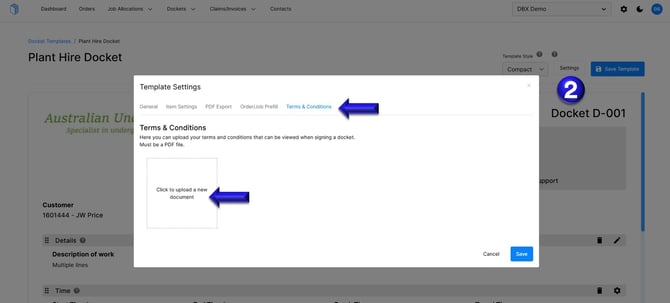
2. In the docket template, click "Settings", then select "Terms and Conditions". Upload your company’s terms and conditions as a PDF to include in your dockets.
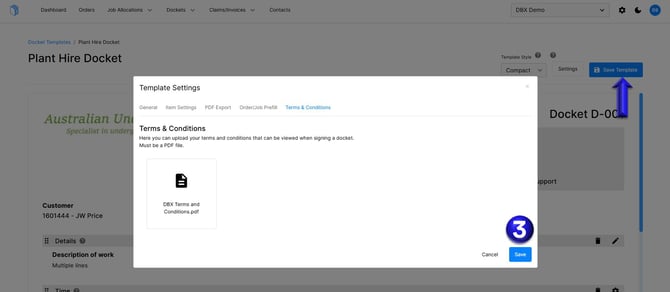
3. Once uploaded, you will then be able to click Save then select Save Template to update the change.
For further help, please contact support@docketbook.com.au