![Docketbook-logos_reverse-horizontal.png]](https://help.docketbook.com.au/hs-fs/hubfs/Docketbook-logos_reverse-horizontal.png?height=40&name=Docketbook-logos_reverse-horizontal.png)
Please note: You need to have Administrator or Super User access to be able to view Activity Log in Docketbook. For more information on User Roles, click here.
To view the Activity Log:
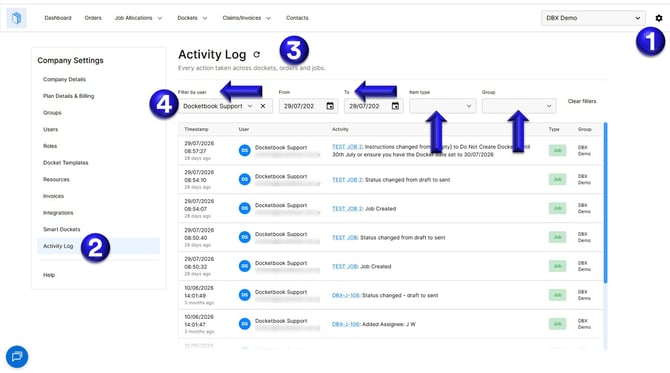
1. Select the settings icon on the top right hand corner of the screen
2. Click Activity Log
3. You can then view every action taken across dockets, orders and jobs.
4. Use the Filter by user, From/To dates, Item type, and Group filters to narrow the results to what you need.
If you have any questions or need any further help, please contact support@docketbook.com.au