![Docketbook-logos_reverse-horizontal.png]](https://help.docketbook.com.au/hs-fs/hubfs/Docketbook-logos_reverse-horizontal.png?height=40&name=Docketbook-logos_reverse-horizontal.png)
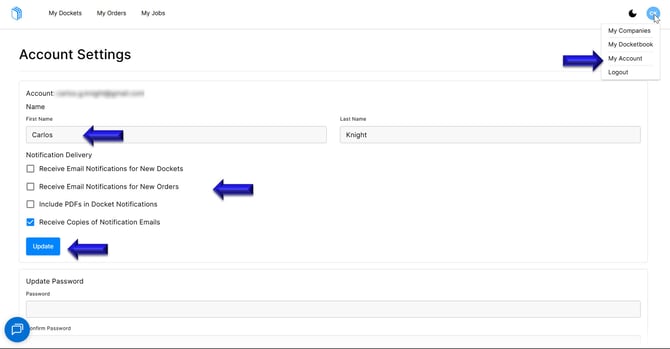
1. Inside your Docketbook Account, click the Blue Icon with your Initials on the top right hand corner of the screen and select "My Account"
2. You can then see and click to update your First Name and Last Name. You will also be able to enable or disable any notifications you receive. Once completed click "Update"
If you need any further help, please contact support@docketbook.com.au