![Docketbook-logos_reverse-horizontal.png]](https://help.docketbook.com.au/hs-fs/hubfs/Docketbook-logos_reverse-horizontal.png?height=40&name=Docketbook-logos_reverse-horizontal.png)
NOTE: To access the Plan Details & Billing section and complete the steps below, you must be either an Administrator or a Super User for your Docketbook company. For more information, click here.
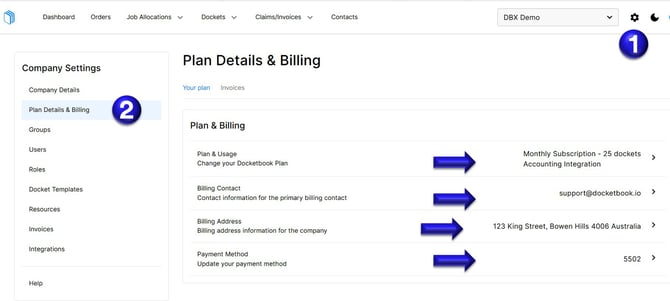
1. Select the Settings Tog on the top right hand corner of the screen
2. Then click the Plan Details & Billing tab where you can then
- View and update your Docketbook Plan by clicking Plan & Usage
- Update your Billing Email address by selecting Billing Contact
- Click Billing Address to change the billing address information for your company
- Change your Credit Card details on file by selecting Payment Method.
If you need further help, please contact support@docketbook.com.au